> For the complete documentation index, see [llms.txt](https://docs.cccties.org/chilospeech/llms.txt). Markdown versions of documentation pages are available by appending `.md` to page URLs; this page is available as [Markdown](https://docs.cccties.org/chilospeech/readme.md).
# はじめに
CHiLO-Speechでは,マイクロソフト社製パワーポイントにナレーション原稿を記載すると,CHiBi-CHiLOに対応した合成音声付きビデオ教材を作成することができます.
#### CHiLO-Speechを使うためには,以下のものを準備して下さい
1. [CHiBi-CHiLOに接続するLMSのアカウント](/chilospeech/prepare/lms.md)
2. [パワーポイントデスクトップ版(Office2016以上)あるいはWeb版](/chilospeech/prepare/powerpoint-1.md)
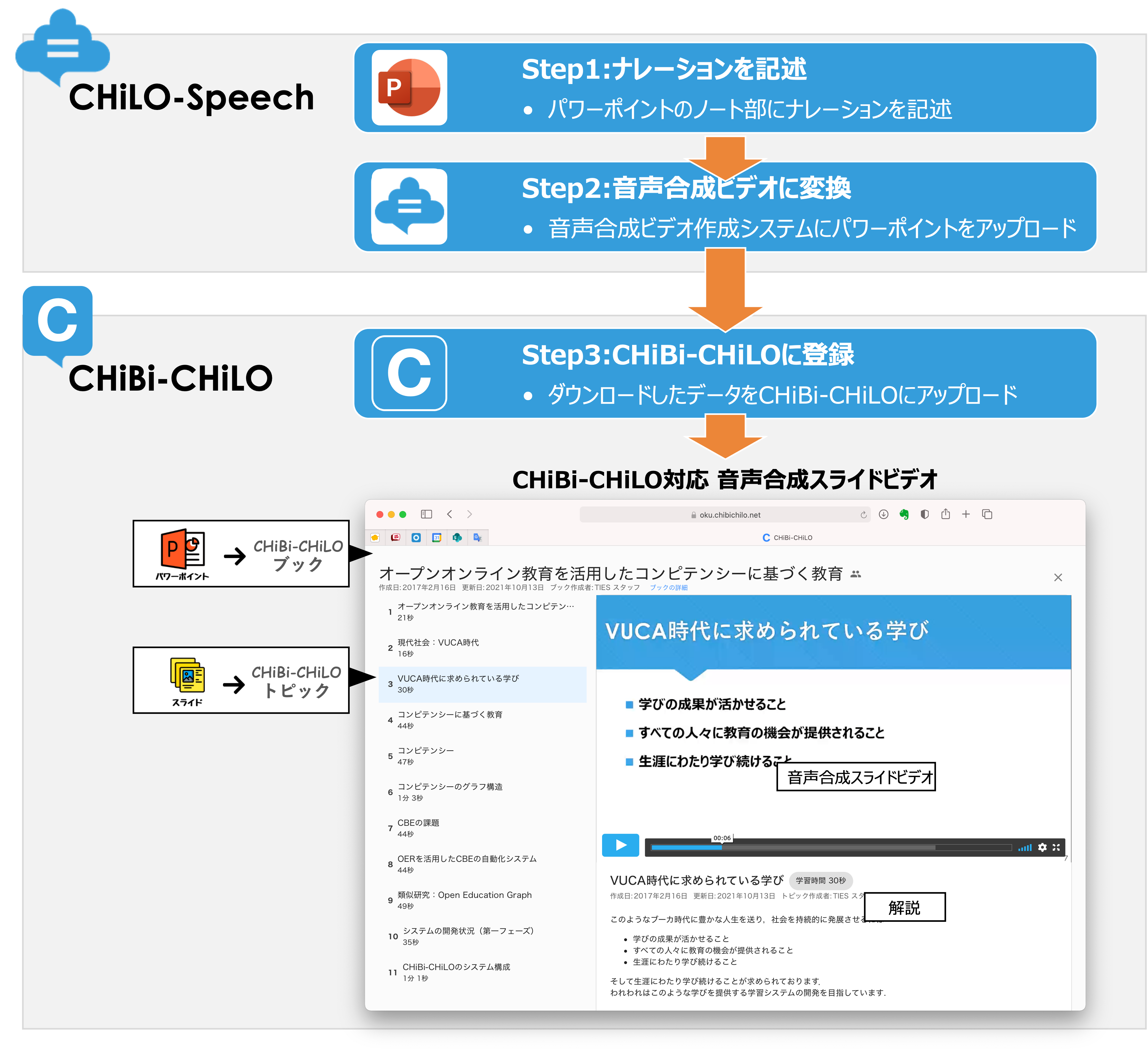
#### CHiLO-Speechを利用したビデオ教材作成の手順は次の通りとなります
Step1:[パワーポイントにナレーションを記述する](/chilospeech/narration/describe.md)
Step2:[パワーポイントをGithubにアップロードしCHiBi-CHiLO登録データを入手する](/chilospeech/video/convert-web.md)
Step3:[CHiBi-CHiLOに登録する](/chilospeech/chibi-chilo/registration.md)
#### CHiLO-Speechで作成するビデオ教材
CHiLO-Speechは,スライド毎に分割されたCHiBi-CHiLO対応の音声合成ビデオ教材を作成します.
CHiBi-CHiLOではビデオ教材全体を **「ブック」** ,スライド毎のビデオを **「トピック」** と呼んでいます.ブックとトピックの詳細については,以下をご確認下さい.
{% embed url="" %}
 CHiLO-Speechを使うためには,以下のものを準備して下さい
1. [CHiBi-CHiLOに接続するLMSのアカウント](/chilospeech/prepare/lms.md)
2. [パワーポイントデスクトップ版(Office2016以上)あるいはWeb版](/chilospeech/prepare/powerpoint-1.md)
####
CHiLO-Speechを使うためには,以下のものを準備して下さい
1. [CHiBi-CHiLOに接続するLMSのアカウント](/chilospeech/prepare/lms.md)
2. [パワーポイントデスクトップ版(Office2016以上)あるいはWeb版](/chilospeech/prepare/powerpoint-1.md)
####  CHiLO-Speechを利用したビデオ教材作成の手順は次の通りとなります
Step1:[パワーポイントにナレーションを記述する](/chilospeech/narration/describe.md)
Step2:[パワーポイントをGithubにアップロードしCHiBi-CHiLO登録データを入手する](/chilospeech/video/convert-web.md)
Step3:[CHiBi-CHiLOに登録する](/chilospeech/chibi-chilo/registration.md)
####
CHiLO-Speechを利用したビデオ教材作成の手順は次の通りとなります
Step1:[パワーポイントにナレーションを記述する](/chilospeech/narration/describe.md)
Step2:[パワーポイントをGithubにアップロードしCHiBi-CHiLO登録データを入手する](/chilospeech/video/convert-web.md)
Step3:[CHiBi-CHiLOに登録する](/chilospeech/chibi-chilo/registration.md)
####  CHiLO-Speechで作成するビデオ教材
CHiLO-Speechは,スライド毎に分割されたCHiBi-CHiLO対応の音声合成ビデオ教材を作成します.
CHiBi-CHiLOではビデオ教材全体を **「ブック」** ,スライド毎のビデオを **「トピック」** と呼んでいます.ブックとトピックの詳細については,以下をご確認下さい.
{% embed url="
CHiLO-Speechで作成するビデオ教材
CHiLO-Speechは,スライド毎に分割されたCHiBi-CHiLO対応の音声合成ビデオ教材を作成します.
CHiBi-CHiLOではビデオ教材全体を **「ブック」** ,スライド毎のビデオを **「トピック」** と呼んでいます.ブックとトピックの詳細については,以下をご確認下さい.
{% embed url="